YouTube Tag Generator API and Autocomplete Explained
Every good YouTube tag generator is powered by the same underlying data source: YouTube's autocomplete system. But what exactly is that system, how does it work, and why does it produce better tags than any keyword database? This is the technical deep-dive most tag tools don't want to explain — because it would reveal how many of them aren't actually using it.
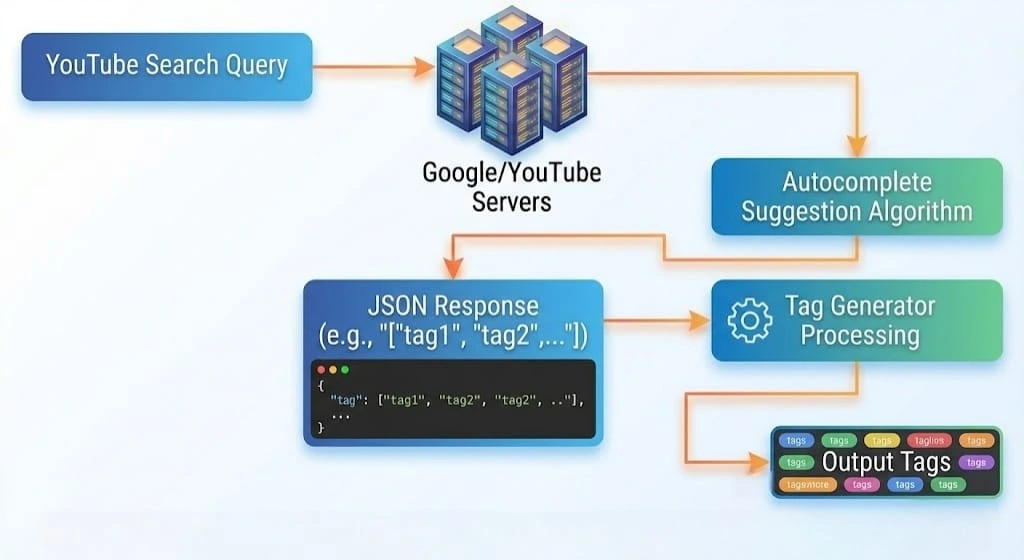
1. What Is YouTube's Autocomplete System?
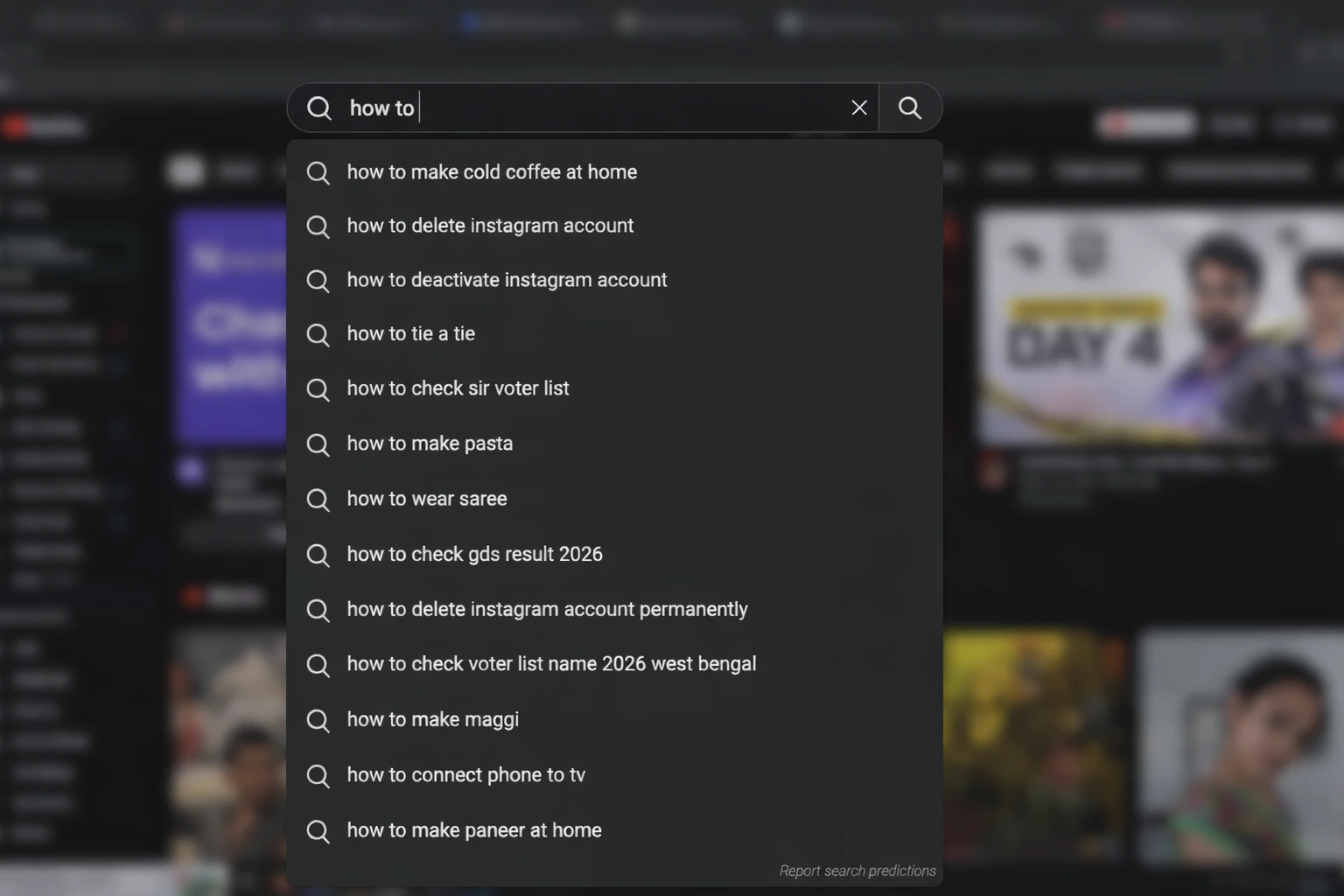
2. How the Autocomplete API Works
YouTube's autocomplete suggestions are accessible via a publicly documented endpoint that YouTube uses to power its own search interface. When you type into YouTube Search, your browser sends a request to this endpoint with your partial query, and the server returns a JSON array of completion suggestions.
How the Request Works (Simplified)
// YouTube autocomplete endpoint
suggestqueries.google.com/complete/search
// Key parameters:
client=youtube
q=[your search query]
hl=[language code, e.g. "en"]
ds=yt
The response returns an array of autocomplete suggestions — typically 8-12 per query. Each suggestion is a phrase that real YouTube users have searched. The order of suggestions reflects relative popularity — more-searched phrases appear first.
A sophisticated tag generator like YTTAGGEN uses this endpoint with multiple variations of your input to collect a broader set of real search patterns. The multi-query approach is what transforms 8-12 suggestions per query into 30-40 optimized tags for your video.
3. Why Autocomplete Data Produces Better Tags
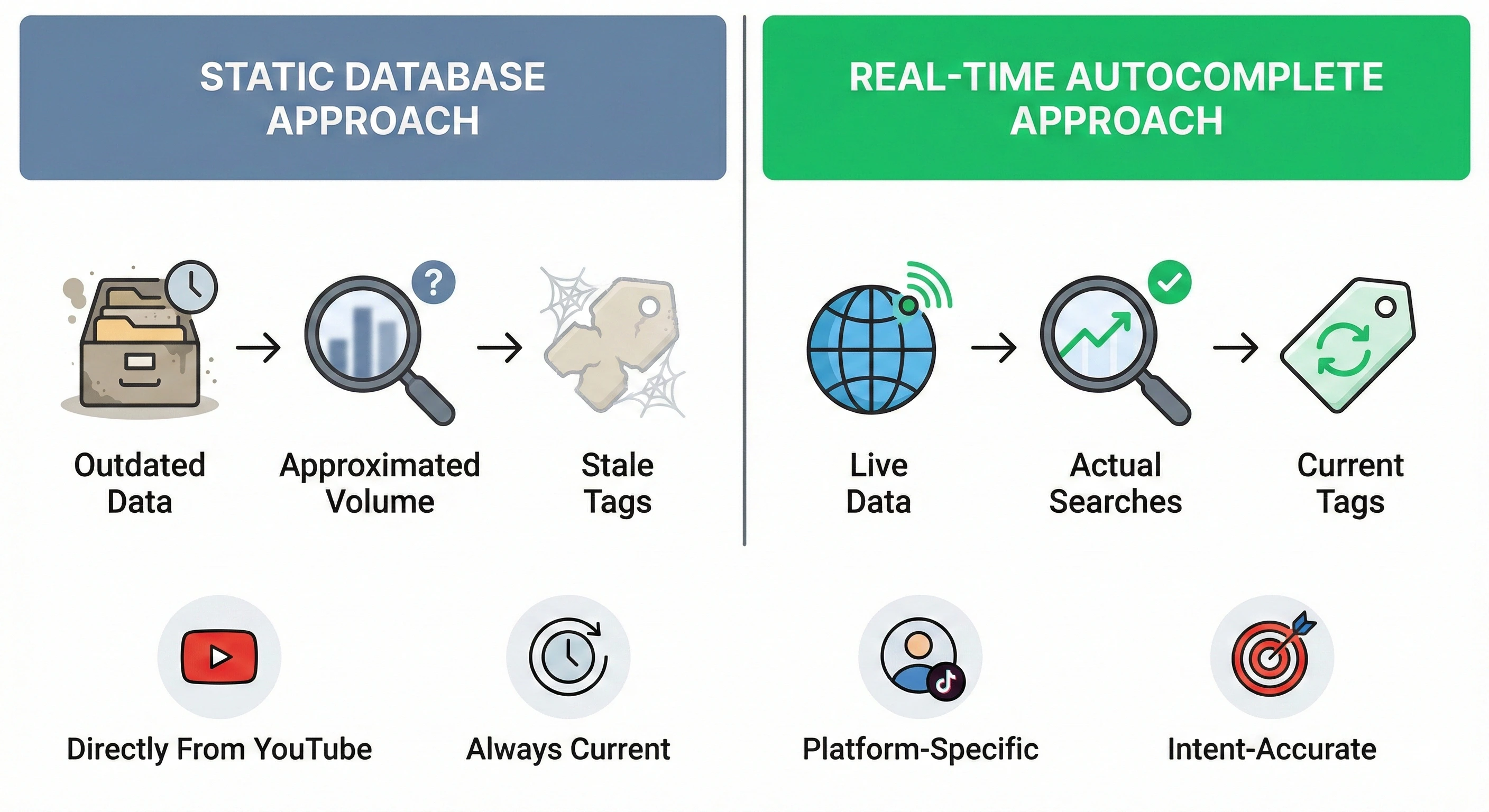
Directly From YouTube
Autocomplete data comes directly from YouTube's own search logs — not sampled or estimated from a proxy dataset. It's ground truth for what YouTube viewers actually search.
Always Current
The autocomplete system updates continuously. A new game that launched 6 hours ago will already have its title appearing in autocomplete if people are searching it. No keyword database updates that fast.
Platform-Specific
General SEO keyword tools measure search patterns across Google Search. YouTube search behavior is different — viewers use different phrases, different intents, and different terminology. Autocomplete data from YouTube is specific to YouTube viewers.
Intent-Accurate
Every phrase in autocomplete represents a real search intent — someone was looking for something specific. This makes autocomplete suggestions inherently intent-aligned, unlike keywords picked from volume estimates.
4. Real-Time API vs Static Keyword Database
This distinction is the most important factor in evaluating any YouTube tag generator — and most tools don't clearly disclose which approach they use.
❌ Static Database Approach
- • Data collected at specific points in time
- • Can be months or years outdated
- • Trending topics missing until database update
- • Generic tags that don't reflect current search patterns
- • Cannot capture niche or regional variations that emerged recently
✅ Real-Time Autocomplete (YTTAGGEN)
- • Updated in real time from YouTube's live search data
- • Trending topics appear within hours of going viral
- • Reflects current search language and terminology
- • Captures regional and language-specific search patterns
- • Intent-accurate — every suggestion is a real search
5. How YTTAGGEN Uses Autocomplete Data
YTTAGGEN queries YouTube's autocomplete system multiple times per generation — not just once. Each query explores a different angle of your input: the primary keyword, secondary components, common modifiers, and related phrasings. This multi-query approach collects a much broader set of real search patterns than a single-query tool.
Query Generation
From your input title, YTTAGGEN generates 4-8 related queries covering variations, components, and related terms of your topic.
Parallel Data Collection
All queries run against YouTube's autocomplete endpoint simultaneously, collecting live suggestion data for each.
Result Pooling
All suggestions are pooled into a single dataset. At this point there may be 40-80 raw suggestions.
Deduplication
Exact and near-duplicate suggestions are identified and removed. The pool shrinks to unique, distinct suggestions.
Relevance Scoring
Each suggestion is scored against the original input. Low-relevance results (things that came up but don't match your video) are filtered out.
Budget Optimization
Remaining suggestions are ordered by relevance and selected to fill the 500-character tag budget efficiently.
6. What the API Can't Tell You
Transparency matters — so here's what YouTube's autocomplete data cannot provide, even when used correctly:
Search Volume Numbers
Autocomplete tells you what people search, but not how often. A phrase that appears in autocomplete could be searched 100 times a month or 1 million times. For volume data, tools like VidIQ or Ahrefs that have access to volume estimates are needed.
Competition / Difficulty
How hard it is to rank for a keyword in YouTube search requires a different data type — analysis of what videos currently rank and how established their channels are. Autocomplete doesn't carry this signal.
Click-Through Rates
What percentage of searchers actually click on results for a given query is a metric YouTube Analytics shows for your own videos, but isn't available through the autocomplete endpoint.
For most creators using tags — especially for regular upload cadences — these missing data points don't significantly impact tag quality. But for strategic content planning, pairing YTTAGGEN with a research tool like VidIQ covers the gaps where volume and competition data matter.
7. YouTube Search Intent Signals Explained
Understanding how YouTube uses the data you provide — including tags — helps you use all your metadata more effectively. YouTube's search system analyzes multiple signals to determine which videos to surface for a given query:
Title Match
The most heavily weighted metadata signal. Your title's keyword alignment with a search query is the primary determinant of search placement.
Description Keywords
Supporting text that expands the keyword context. YouTube indexes your description and uses it to understand video topic depth.
Tag Match
Tags contribute as a secondary confirmation layer — especially for alternate spellings, related terms, and topic connections the title doesn't cover.
Engagement Signals
Watch time, click-through rate, likes, and comments. High engagement validates relevance — a video that keeps viewers watching ranks higher for its target keywords over time.
Semantic Relevance
YouTube's AI can now understand topic relationships without exact keyword matches. Your LSI (semantic) tags help with this — they build a topic picture rather than just matching individual keywords.
Channel Authority
YouTube factors in your channel's topic consistency and authority in a niche. Regular uploads in a focused area build algorithmic authority over time.
The practical takeaway: tags work best as part of a coordinated metadata system. Make sure your title, description, and tags all reinforce the same topic. Tags that contradict or diverge from your title and description confuse the signal — aligned tags that reinforce what your title says are the ones that help.
Put This Knowledge to Work
Generate data-driven tags from YouTube's own autocomplete system. No login. No limit.
Open Free Tag Generator →Related Guides
New From The Blog
Frequently Asked Questions
How does YouTube autocomplete work for tags?
YouTube autocomplete predicts search completions based on real user search data — weighted by frequency, recency, and location. Tag generators query this system with your video title to surface the actual phrases real viewers type. This is more reliable than guessing keywords manually.
Is YouTube autocomplete data updated in real time?
Yes. YouTube's autocomplete reflects current trending searches and updates continuously. This is why generating tags with a live autocomplete-based tool gives you fresher, more relevant results than static keyword databases that may be months out of date.
Does YouTube autocomplete vary by location?
Yes — autocomplete suggestions are partially localised. Searches from India may surface different completions than searches from the US for the same base query. If your audience is predominantly from a specific region, the tags generated when you're in that region will be more targeted to that market.
YouTube Tags Strategy — Complete Guide Series
Everything you need to know about YouTube tags — from whether they work, to how many to use, to niche-specific lists for your channel type. Use YTTAGGEN's free tag generator to apply what you learn instantly.
Do Tags Still Matter in 2026? →
Honest algorithm breakdown
How Many Tags Should You Use? →
The 500-character strategy
Tags Not Working? Fix It →
5 real reasons + solutions
Best Gaming Tags 2026 →
Full lists for every gaming niche
Best Cooking Tags 2026 →
Recipe, dietary, cuisine lists
Best Tech Review Tags 2026 →
Smartphone, laptop, unboxing tags
Best Finance Tags 2026 →
Investing, crypto, personal finance
Tags vs Hashtags Explained →
Key differences + when to use each
How to Add Tags Step by Step →
YouTube Studio guide 2026
YouTube Tags for Beginners →
Complete 2026 beginner guide