How Does a YouTube Tag Generator Work? (Full Technical Explanation)
We built YTTAGGEN — so we can tell you exactly what happens between when you enter a title and when 35 optimized tags appear. Most creators have no idea how these tools actually work. Understanding the process helps you use them better, and helps you identify which tools are actually giving you real data vs. recycling outdated guesses.
1. Two Fundamental Types of Tag Generators
Not all tag generators are built the same. Before anything else, you need to understand the two fundamentally different architectures — because they produce dramatically different results:
Static Database Tools
Pre-populated with keyword data collected at some point in the past. Suggestions reflect what was popular when the database was last updated — which could be months or years ago. Trend-unaware. Useful for evergreen topics; weak for anything trending.
Real-Time Data Tools
Query YouTube's live autocomplete system at the moment you search. Suggestions reflect what real users are typing right now. Trend-aware, niche-accurate, always current. YTTAGGEN uses this approach.
If you've ever used a tag generator and thought 'these tags look generic and outdated' — you were probably using a static database tool. Real-time tools give you the search landscape as it exists today.
2. YouTube's Autocomplete — The Real Data Source
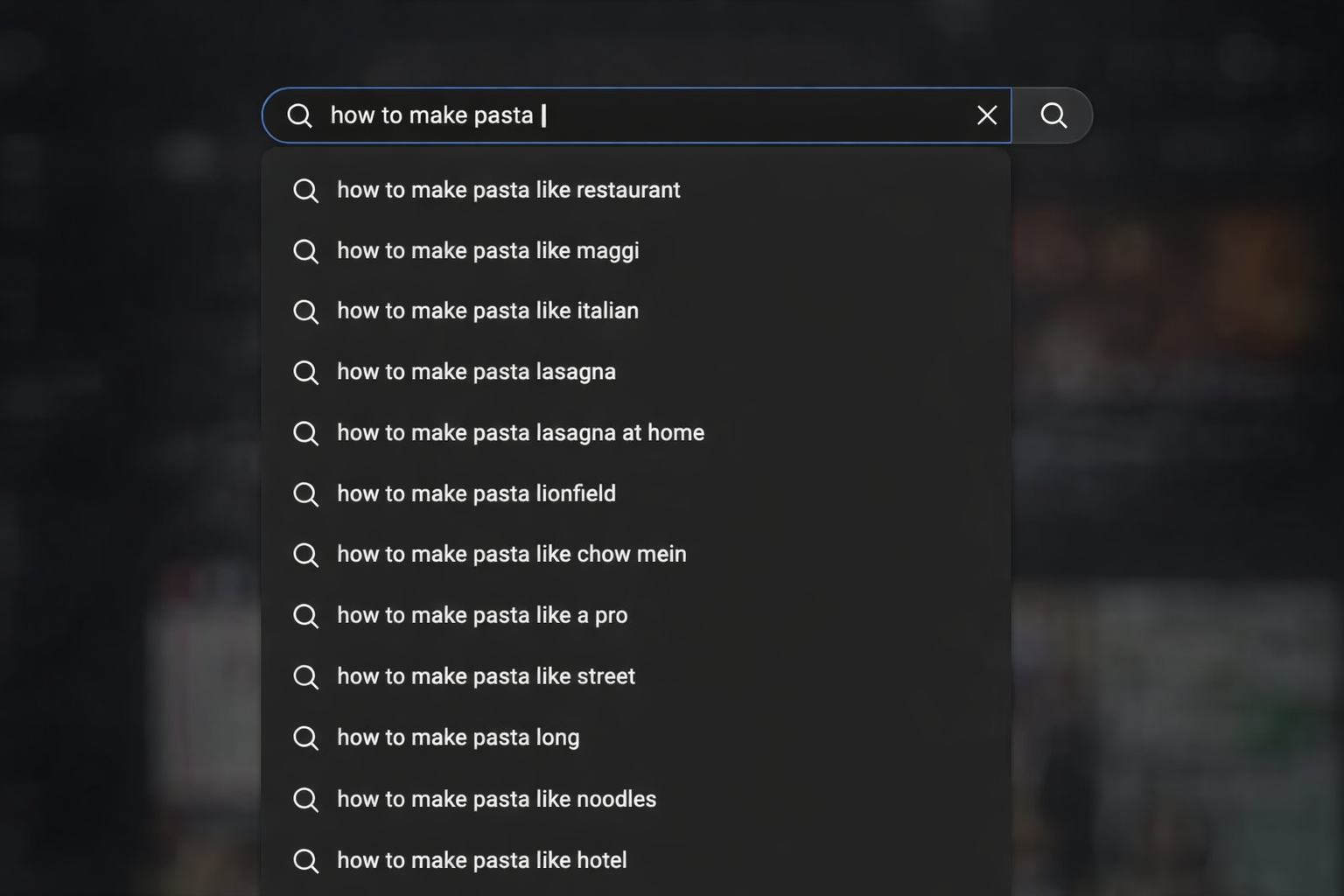
When you type into YouTube's search bar and see the dropdown suggestions appear, you're seeing YouTube's autocomplete in action. This system is powered by actual user search data — it surfaces the phrases that real people type most frequently. It's updated constantly as search patterns change.
A real-time tag generator accesses this autocomplete data programmatically. Instead of guessing what might be relevant to your video, the tool essentially asks YouTube: 'Given this topic, what are viewers actually searching for?' The answer comes directly from YouTube's own search logs — making it the most accurate source of keyword data available for YouTube SEO specifically.
🔍 Why Autocomplete Data Is Superior
Third-party keyword databases estimate search volumes from sampled data. YouTube's own autocomplete reflects 100% of actual searches on the platform, updated in real time. For YouTube-specific SEO, there is no more authoritative data source. Tools that use this data are giving you ground truth — tools that don't are giving you approximations. For the full technical deep-dive, see our YouTube Tag Generator API and Autocomplete guide.
3. Why Multi-Query Approach Generates Better Tags
Here's the critical quality differentiator between basic and advanced tag generators. A basic tool sends your input as a single autocomplete query and returns whatever YouTube suggests. It gets back 10-12 suggestions and presents them as your tag set.
A multi-query system — which is what YTTAGGEN uses — generates multiple related queries from your input and fires them all. Here's how this looks for a title like 'Minecraft survival tips for beginners':
Multi-Query Example: "Minecraft survival tips for beginners"
"Minecraft survival" → captures survival-mode specific searches
"Minecraft tips" → captures general tips and tricks searchers
"Minecraft beginner guide" → captures new player intent
"Minecraft survival for beginners" → captures the full long-tail phrase
"Minecraft tips 2026" → captures current-year searches
The result: instead of 10-12 generic tags from one query, you get 30-40 tags covering the full search landscape around your topic. YTTAGGEN deduplicates all results so you don't get redundant tags from overlapping queries.
4. Relevance Scoring: Separating Signal From Noise
Multi-query expansion creates a new problem: some of the autocomplete suggestions you collect won't actually be relevant to your specific video. If you query 'Minecraft survival,' YouTube might suggest 'Minecraft survival horror mod' — which is a real search, but not relevant if your video is about vanilla survival basics.
This is where relevance scoring comes in. Every suggestion gets scored against the original input using term overlap analysis and semantic similarity. Suggestions that score below a relevance threshold are filtered out before they reach your tag list.
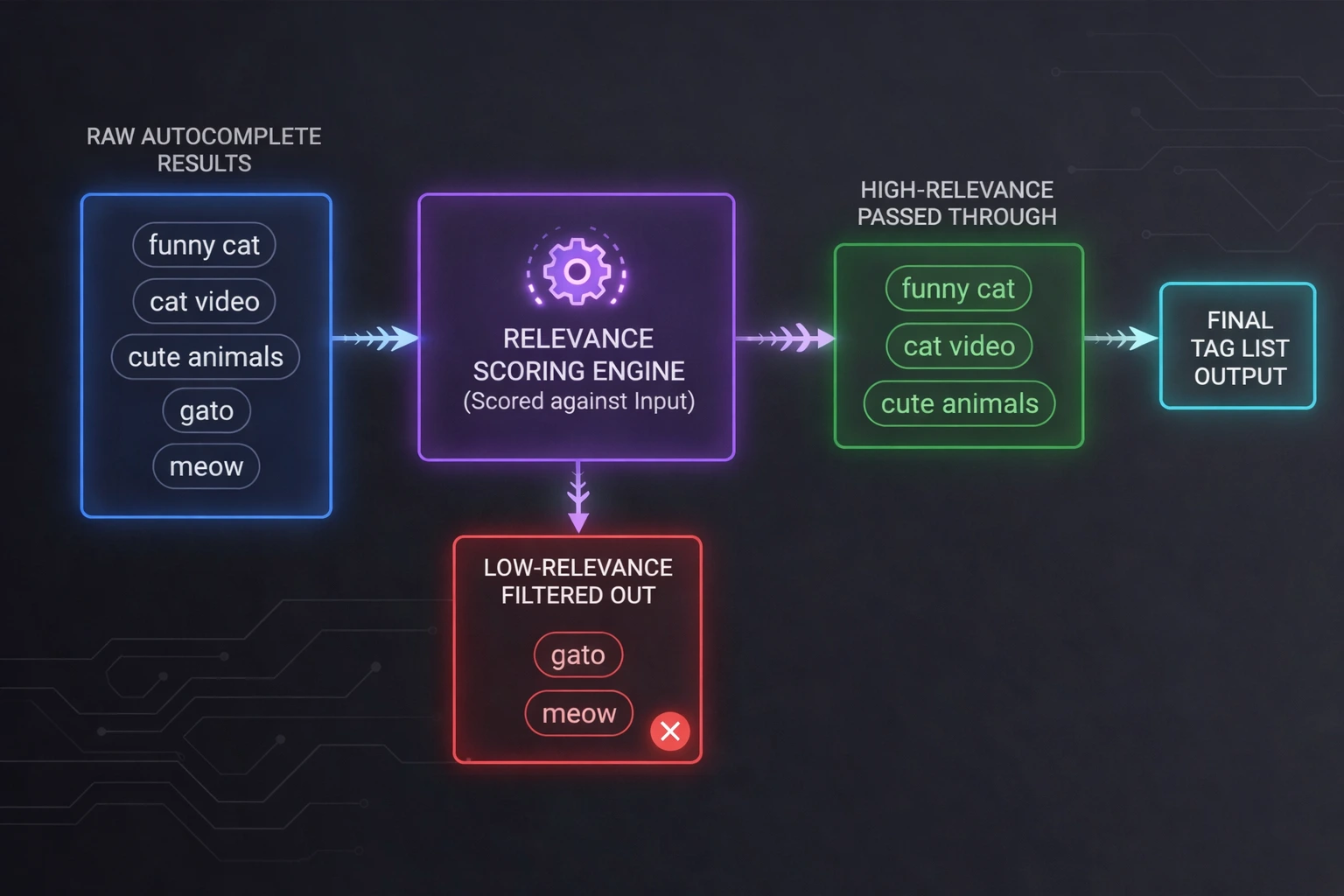
The quality of this filtering is what separates good tag generators from tools that just dump every suggestion into a list. YTTAGGEN's relevance scoring means the tags you receive are specifically relevant to your video — not just any tags that happened to come up in nearby autocomplete results.
5. The 500-Character Budget Optimizer
YouTube enforces a hard 500-character limit on the tags field. This budget needs to be used efficiently — wasting it on redundant variations or low-value tags is a missed opportunity. A sophisticated tag generator includes a budget optimizer that decides which tags to include and in what order.
500-Character Budget Strategy
YTTAGGEN displays a real-time character counter as your tags are generated so you can see exactly how much of the 500-character budget is being used. When you hit Copy, you get exactly the right amount of tags to paste directly into YouTube Studio without any manual character counting.
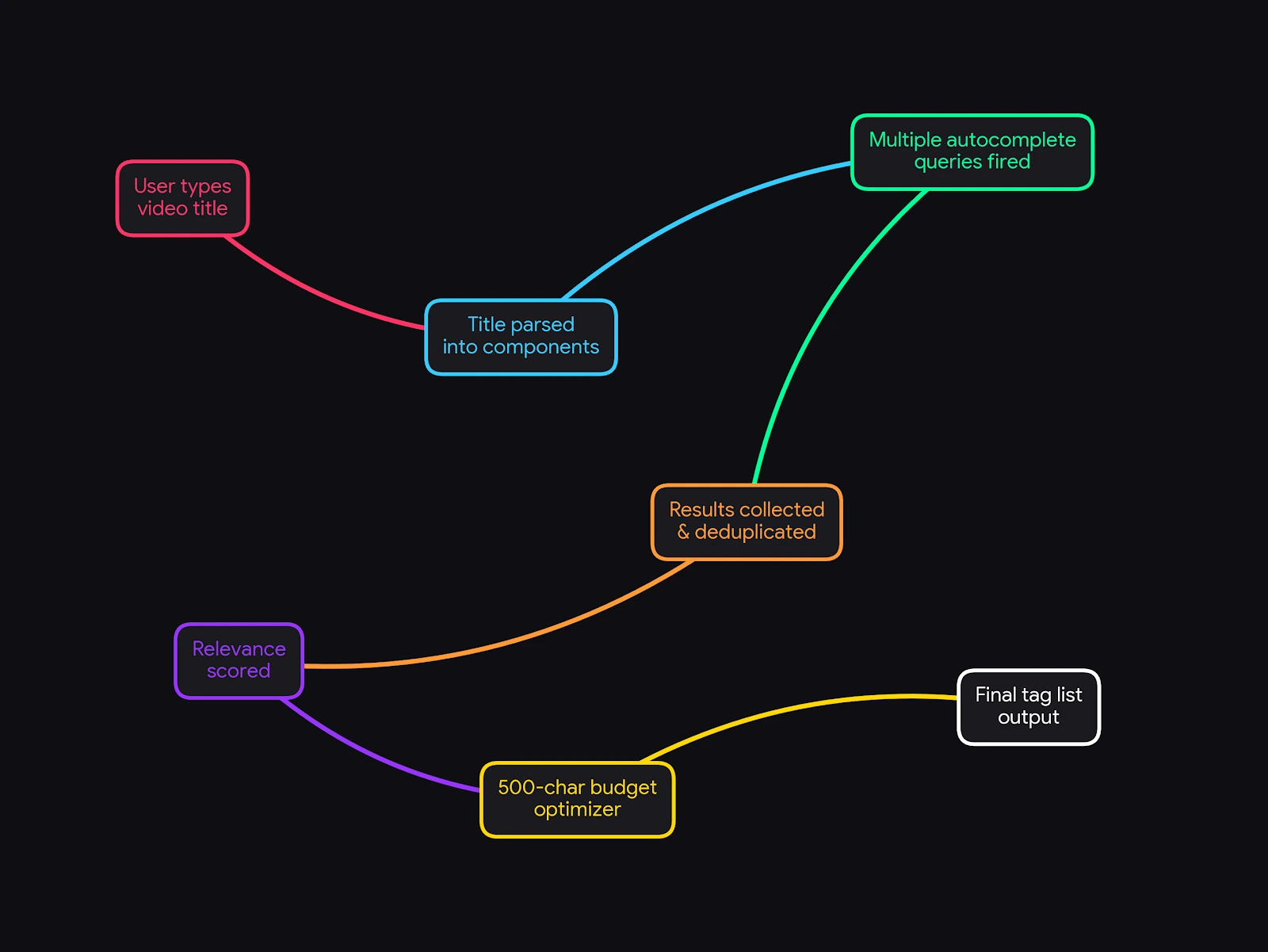
6. YTTAGGEN's Exact Process, Step by Step
Step 1: Parse the Title
YTTAGGEN breaks your input into primary keyword, secondary keywords, topic modifiers (like 'easy' or '2026'), and any niche signals (game names, recipe types, etc.).
Step 2: Generate Query Set
Based on the parsed components, YTTAGGEN constructs 4-8 targeted autocomplete queries that cover different angles of your topic — variations, related terms, and common viewer phrasings.
Step 3: Collect Autocomplete Data
Each query is fired against YouTube's autocomplete system. Results come back as real, live search suggestions from YouTube's own data.
Step 4: Deduplicate & Score
All results are pooled, exact and near-duplicates removed, and each remaining suggestion is scored for relevance to the original input. Low scorers are filtered out.
Step 5: Budget Optimization
Remaining tags are ordered by relevance and selected to fill the 500-character limit efficiently, prioritizing the highest-value tags first.
Step 6: Output
The final tag list is displayed with a real-time character counter. One click copies everything, formatted ready to paste into YouTube Studio.
7. Why This Architecture Matters for Your Videos
The practical implication of all this: YTTAGGEN's tags aren't guesses. They're data-driven suggestions based on what real YouTube viewers are actually searching for, right now, for your specific topic. The relevance scoring means they're filtered to what's actually relevant to your video. The budget optimizer means you're using your 500-character limit as effectively as possible.
For creators who upload regularly, this kind of systematic, data-driven tagging consistently outperforms ad-hoc manual tagging in terms of search discovery over time. Not because tags are the biggest ranking factor — they're not — but because getting them right, consistently, compounds. Every video that's properly tagged is one more video correctly positioned in YouTube's content graph.
See YTTAGGEN in Action
Try it on your next video. Enter the title and see real YouTube data turn into optimized tags in seconds.
Open Free Tag Generator →Related Guides
New From The Blog
Frequently Asked Questions
How does a YouTube tag generator work?
A tag generator queries YouTube's autocomplete API with progressively built versions of your input title — from 2-word combinations up to the full phrase. Each query returns real search suggestions from YouTube's own system. These suggestions are scored for relevance, deduplicated, and packed into your 500-character tag budget.
Are tag generator results accurate?
Yes — generators that use live YouTube autocomplete data are highly accurate because they pull directly from what viewers are actually searching right now. Static database generators are less reliable because they may reflect outdated search patterns from months or years ago.
What is YouTube's autocomplete API?
YouTube's autocomplete system generates the dropdown suggestions you see when typing in the YouTube search bar. It's powered by real search data weighted by volume, recency, and user location. Tag generators query this system to surface what real viewers search for.
YouTube Tags Strategy — Complete Guide Series
Everything you need to know about YouTube tags — from whether they work, to how many to use, to niche-specific lists for your channel type. Use YTTAGGEN's free tag generator to apply what you learn instantly.
Do Tags Still Matter in 2026? →
Honest algorithm breakdown
How Many Tags Should You Use? →
The 500-character strategy
Tags Not Working? Fix It →
5 real reasons + solutions
Best Gaming Tags 2026 →
Full lists for every gaming niche
Best Cooking Tags 2026 →
Recipe, dietary, cuisine lists
Best Tech Review Tags 2026 →
Smartphone, laptop, unboxing tags
Best Finance Tags 2026 →
Investing, crypto, personal finance
Tags vs Hashtags Explained →
Key differences + when to use each
How to Add Tags Step by Step →
YouTube Studio guide 2026
YouTube Tags for Beginners →
Complete 2026 beginner guide