YouTube Tags Not Working? Here Are the 5 Real Reasons Why
You've added tags, your video still isn't ranking, and you're wondering if tags do anything at all. Before writing them off entirely, understand this: tags rarely fail on their own. What's usually happening is one of five specific, fixable problems — and once you identify which applies to your situation, the fix is straightforward.
Reason 1: Your Tags Are Irrelevant to the Video
This is the most common problem — and it sounds obvious, but it happens in subtle ways. It's not just about adding completely unrelated tags (like tagging "gaming" on a cooking video). It's also about adding tags that are technically related but don't match the actual search intent of your specific video.
Quick symptom list: tags not showing effect on views, why YouTube tags not working despite correct setup, tags not helping YouTube search, tags ignored by algorithm, tag troubleshooting needed, no effect on views from tags, tags not appearing in YouTube Studio properly, tag visibility in YouTube analytics unclear. This guide solves all of these.
Example: You upload a video titled "Easy Chocolate Cake Recipe for Beginners." You add the tag "chocolate cake" — which seems relevant. But if your video is specifically a beginner tutorial, the intent-matched tag is "easy chocolate cake recipe" or "chocolate cake for beginners." The broad tag "chocolate cake" puts you in competition with channels that have millions of views on the same topic.
🔧 The Fix
Use tags that match the specific video, not the general category. If you're covering a specific recipe, game, product, or tutorial, your tags should reflect that specificity. Use YTTAGGEN — enter your full video title (not just the topic) and it will generate tags matched to that exact search intent from real YouTube autocomplete data.
Reason 2: Tags Are Being Overridden by Your Title and Description
YouTube's algorithm gives significantly more weight to your video title and description than to tags. When these three elements conflict — or when the title and description are weak — tags lose their effectiveness entirely.
YouTube tag conflicts occur when your tags suggest a different topic than your title or description. For example: a cooking video titled "Quick Pasta Recipe" that has gaming tags in the tag field. YouTube resolves this by favouring the stronger signals (title + description) and effectively treating the conflicting tags as noise. The result: tags overridden by title/description — not because tags don't matter, but because they're working against your other metadata.
One of the most misunderstood dynamics in YouTube SEO is how tags are overridden by title and description. When these three elements conflict — your title says one thing, your tags say another — the algorithm resolves the conflict by favouring title and description. Tags become effectively ignored by the algorithm when they contradict or are unrelated to the primary content signals.
The conflict problem: If your title says "My Cooking Journey #47" (vague) but your tags say "easy pasta recipe, beginner cooking, Italian food" — the algorithm gets confused. The title doesn't support the tag signals, so neither works well.
The weak title problem: Tags are a supporting signal. They confirm what your title and description establish. If your title is vague or doesn't contain your target keyword, your tags don't have a strong foundation to build on.
🔧 The Fix
Ensure your title, description, and first tag all contain or reference the same primary keyword. Think of it as a three-layer confirmation: title introduces the keyword → description reinforces it → tags confirm it. When all three align, the algorithm's confidence in your video's topic increases significantly. Read our guide on how YouTube tag generators work for a deeper understanding of this alignment principle.
Reason 3: Tag Spam Filter Is Triggered
YouTube has an active spam and deceptive practices policy that covers tags. Adding tags that don't relate to your video, stuffing tags with dozens of keyword variations, or trying to use trending keywords unrelated to your content can trigger the filter — which results in your video getting reduced distribution, not increased visibility.
Understanding tag policy and strikes on YouTube is critical. The tag relevance and spam filtering system is automated — YouTube doesn't manually review each video's tags. Instead, it compares your tag signals against your content signals. Tags that conflict with your actual video content trigger the spam filter, which suppresses distribution rather than issuing formal strikes. The end result looks the same: your video gets fewer impressions. Knowing when to remove irrelevant tags from existing videos is just as important as getting new tags right.
Common spam patterns the filter catches:
Adding popular creator names (MrBeast, PewDiePie) to unrelated videos
Using the same keyword repeated with minor variations across 20+ tags
Tagging trending events or topics with no connection to the video content
Excessive tag density — 40+ tags all fighting each other for relevance signals
🔧 The Fix
Keep every tag directly relevant to your video. Remove any tag that a viewer who's just watched your video would consider misleading or unrelated. Quality over quantity — 10 precise tags will always outperform 40 loosely related ones.
Reason 4: Engagement Signals Are Too Weak to Let Tags Work
This is the most important reason to understand — and the one most creators miss entirely. Tags are a secondary signal. They work best when your primary signals (click-through rate, watch time, audience retention) are already healthy. If those are weak, tags cannot compensate.
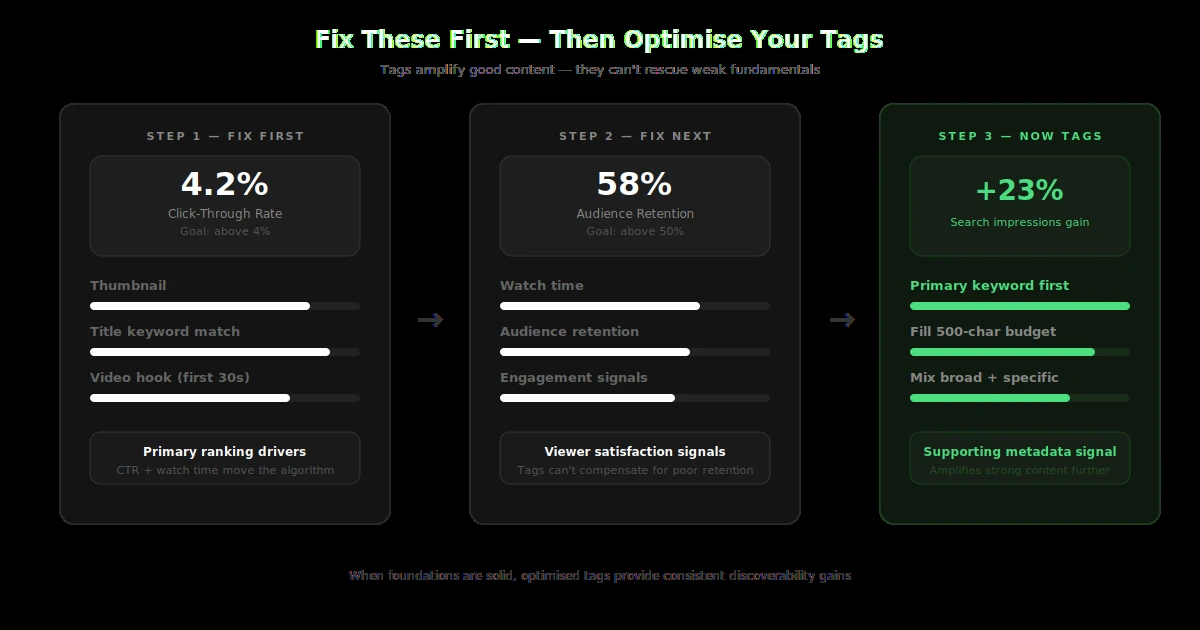
Think of it this way: YouTube uses tags to help decide where to show your video. But whether it continues showing it there depends entirely on how viewers react. A well-tagged video that gets clicked and immediately abandoned teaches YouTube that this video doesn't satisfy searchers — and YouTube stops showing it, regardless of tag quality.
Check These First
- → CTR below 2%? Fix thumbnail first
- → Avg view duration under 30%? Fix intro
- → High impressions, low clicks? Fix title
Then Optimise Tags
- → CTR above 4% + good retention?
- → Now tags can amplify performance
- → Refresh old tags on strong videos
🔧 The Fix
Use YouTube Analytics to check your impression CTR and average view duration. If CTR is under 3% or average view duration is under 35%, focus on those before investing time in tag optimisation. Fix the foundation, then optimise the metadata.
Reason 5: Tag and Audience Location Mismatch
YouTube serves localised search results. If most of your audience is in India but your tags are all in US English idioms, your tags may not surface your video in the local search patterns your actual audience uses.
Tags and regional search issues are a silent performance killer. YouTube's search index is localised — the same query returns different results for users in different countries. If your tags are optimised for one region's search vocabulary but your actual audience is in another, your tags are working against you rather than for you.
Real example: A cooking channel targeting Indian audiences used tags like "quick dinner recipes" and "weeknight meals." But their audience was searching "quick dinner recipes in Hindi" or region-specific terms like "2-minute snack recipe India." The tags weren't wrong — they just weren't matching the actual regional search signals.
🔧 The Fix
Check your YouTube Analytics audience geography. If your top audience countries differ from what your tags target, add location modifiers (country, language variant) to some tags. For example: "Indian cooking recipes," "easy recipes India," or bilingual tags when your content crosses language communities.
Frequently Asked Questions
Why aren't my tags working on YouTube?
Usually one of five reasons: tags don't match search intent, title/description contradict tags, spam filter triggered by stuffing, engagement signals too weak to let tags activate, or regional audience mismatch. Check all five systematically.
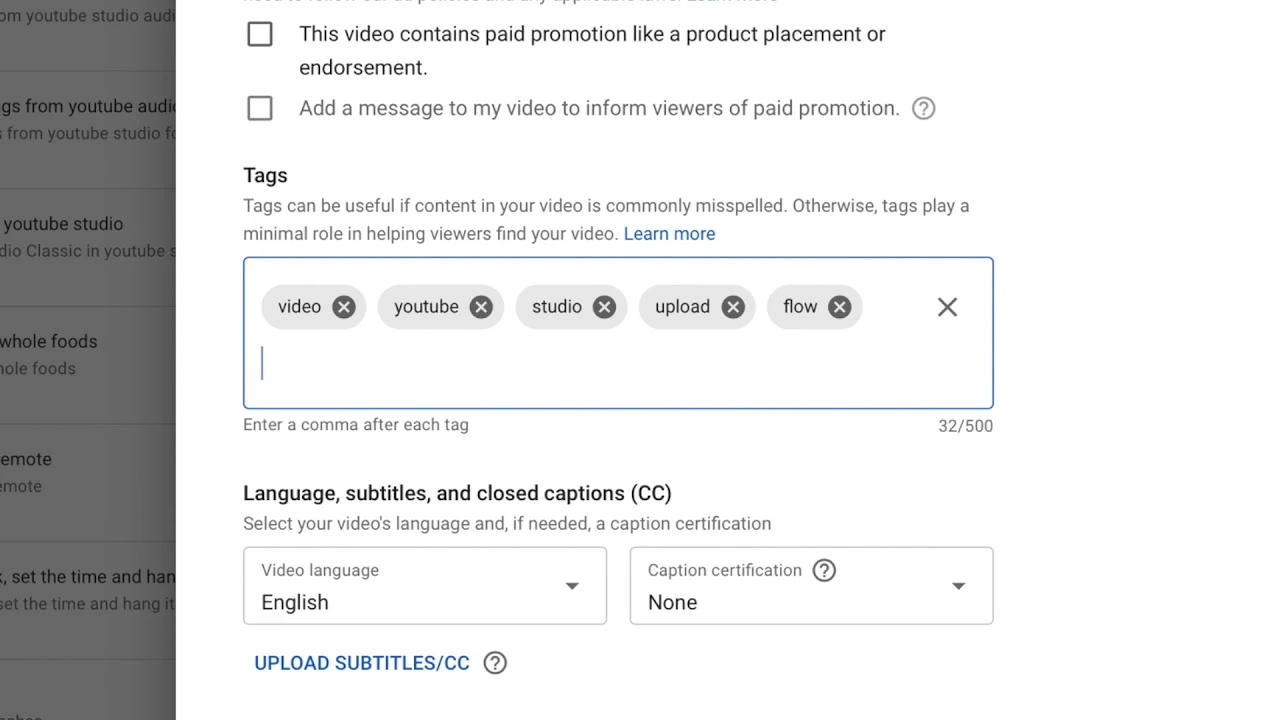
How do I fix tags not showing in YouTube Studio?
Tags are always visible in YouTube Studio under Video Details → More Options. If you can't find them, ensure you're using the full desktop Studio interface — the mobile app uses a simplified view that may hide the tags field.
Can tags be penalised on YouTube?
Yes. Misleading or irrelevant tags violate YouTube's spam and deceptive practices policy. This can reduce distribution on affected videos. Repeat violations can lead to strikes or account-level penalties. Always keep tags relevant to your actual content.
Do tags not picking up autocomplete mean they won't work?
Tags don't need to be in YouTube's autocomplete to work. They need to be relevant to your video. However, tags that do match autocomplete suggestions are ideal — it means real viewers are actively searching those exact phrases.
Related Guides
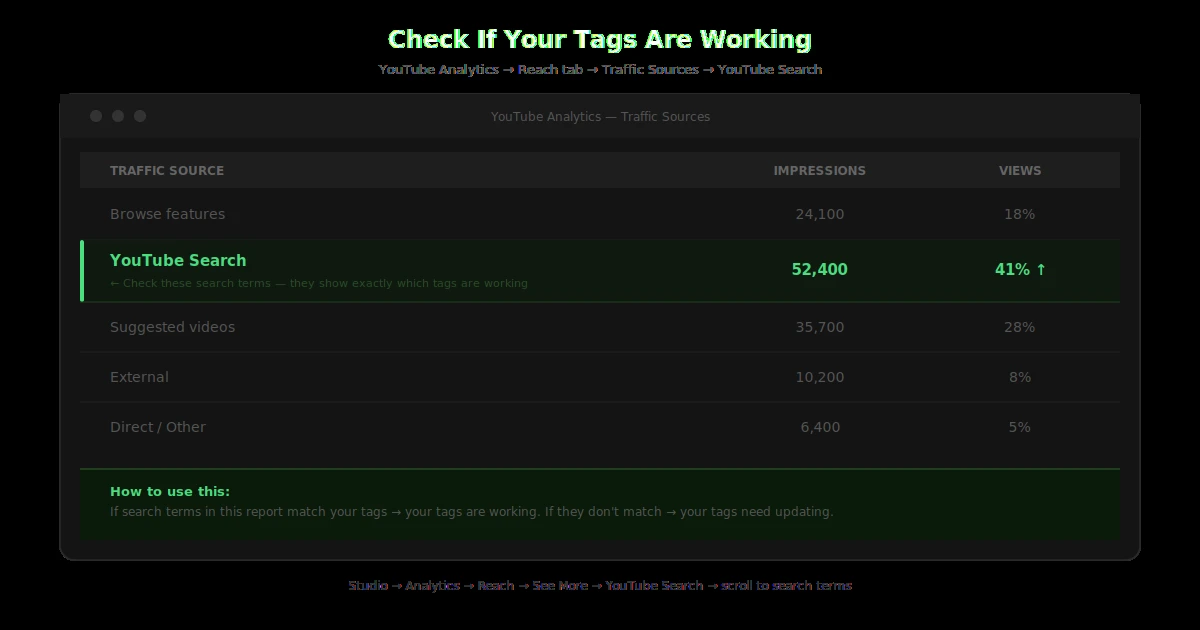
If tags not appearing in YouTube Studio as expected, use the desktop interface — the mobile app sometimes hides the tags field. Also check tag visibility in YouTube Analytics via Traffic Source data to confirm which search terms are actually driving views.