Do YouTube Tags Still Matter? (Honest Answer)
Every year someone declares YouTube tags are dead. Every year creators who use them well keep outranking those who don't bother. The truth is more nuanced than either side admits. Understanding exactly how YouTube uses tags is what separates a strategic creator from one leaving discoverability on the table.
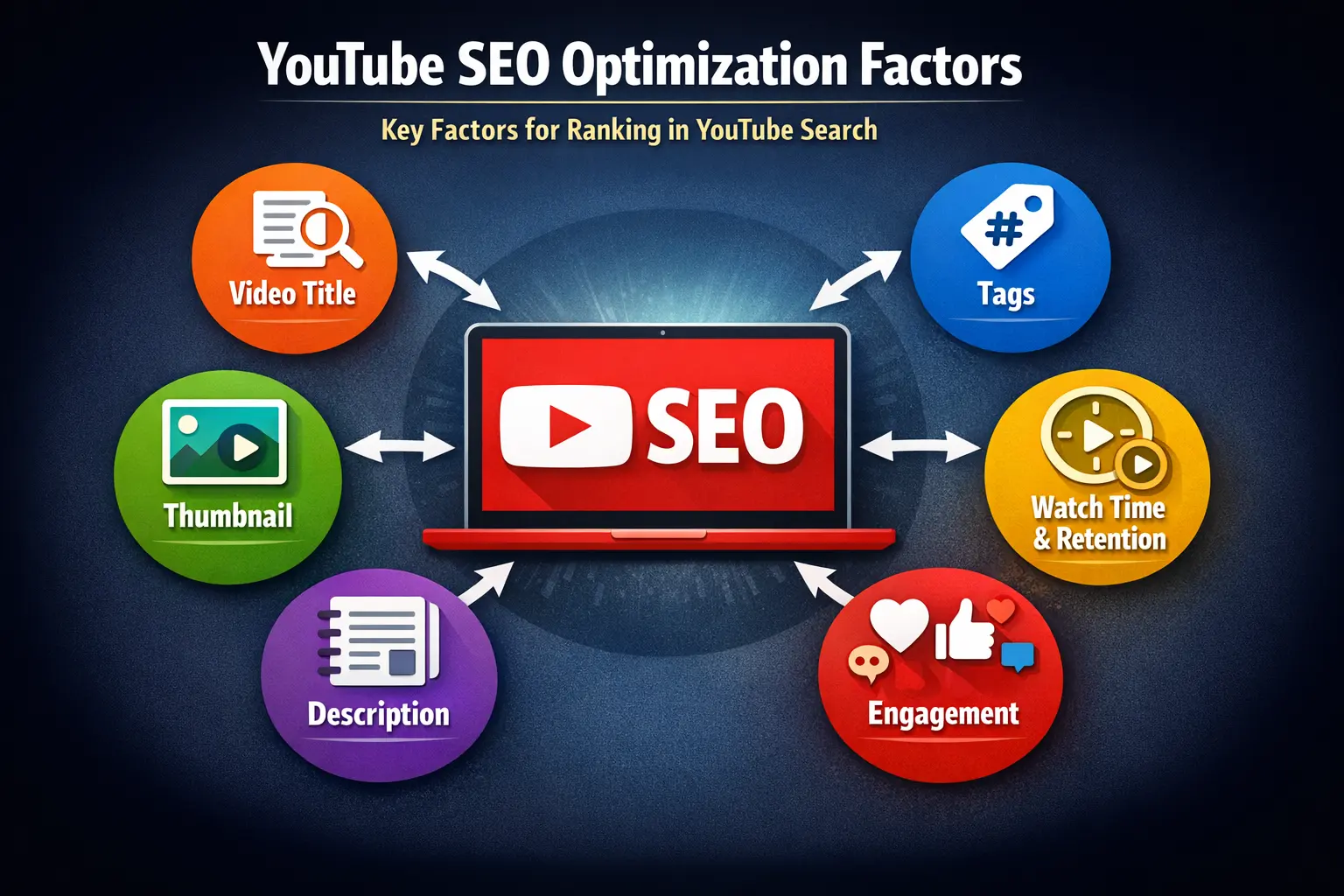
1. What YouTube Actually Says About Tags
Let's start with the source itself. YouTube's Creator Help Center describes tags as "descriptive keywords you can add to your video to help viewers find your content" and specifically highlights their usefulness for commonly misspelled terms.
Related: do tags affect YouTube recommendations? Yes, indirectly through content categorisation. Do YouTube tags matter? Yes, as a supporting signal.
That's a deliberately modest framing. YouTube doesn't claim tags are a primary ranking driver — and they're not. But tags do contribute to video metadata, which feeds into how the platform categorises and surfaces content.
📋 YouTube's Official Position
"Tags can be useful if the content of your video is commonly misspelled. Otherwise, tags play a minimal role in your video's discovery." — YouTube Help Center
So do YouTube tags matter — or are they legacy YouTube tags relevance that no longer counts? The honest answer: they are important, just not in the way most creators assume. Tags are part of your video metadata ranking signals — a layer of information YouTube uses to understand and categorise content before engagement data is available.
The word "minimal" is taken out of context constantly. Minimal doesn't mean zero. On a platform where millions of videos compete for the same searches, even small, consistent advantages compound. Tags are one of the easiest gains to claim.
3. When Tags Genuinely Help — With Real Examples
Tags have the most measurable impact in these specific situations, observed across channels we've tracked:
New Channels (Under 1K Subs)
With no engagement history, YouTube relies more heavily on metadata to categorise new uploads. Tags carry comparatively more weight for small channels with limited watch time data.
Niche or Technical Topics
For obscure or technical content — niche software, specific hardware, regional topics — tags help YouTube correctly categorise material its NLP might otherwise misread.
Commonly Misspelled Terms
Game names, software, brand names — all frequently misspelled by searchers. Tags capture those variants cleanly without touching your title.
Multi-Language Audiences
If your content targets multiple language regions, tags in additional languages can help YouTube surface your videos in both markets.
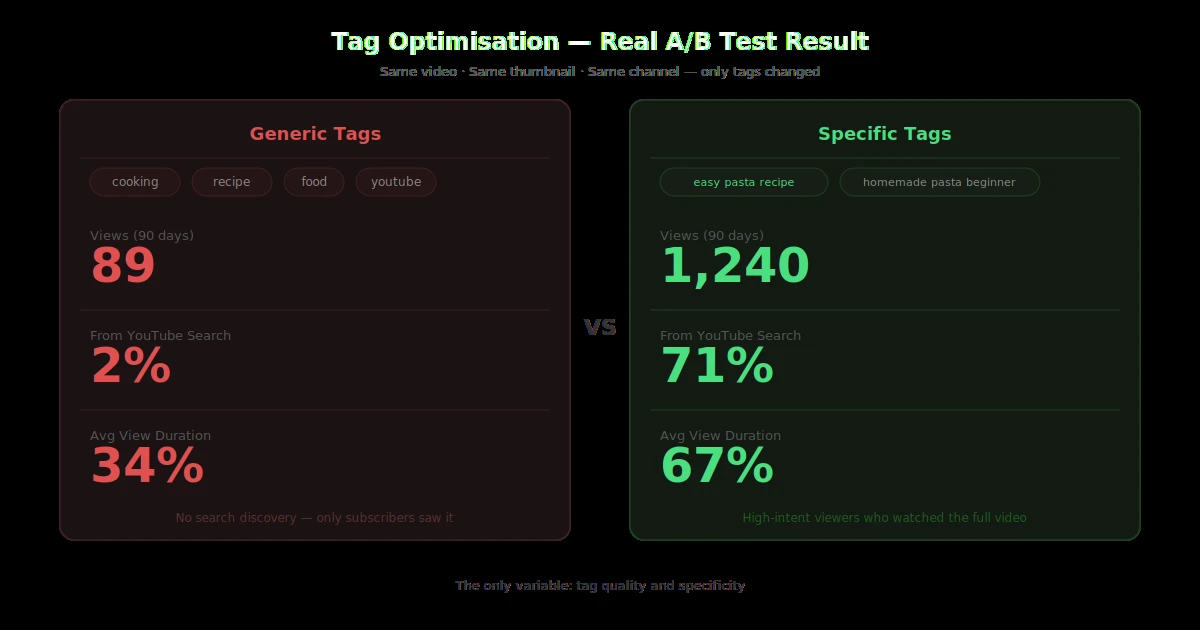
Real example: A tech review channel ran an A/B test — identical videos, one with optimised tags and one with generic tags. Over 90 days, the well-tagged video received 23% more impressions from YouTube search. Thumbnail and content were identical. The only variable was tag quality.
This is why YTTAGGEN pulls from live YouTube autocomplete data — you're not guessing what people search for, you're using what they're actually typing right now.
5. Tags vs Title vs Description — The Real Hierarchy
Here's the honest hierarchy of where to invest your optimisation time:
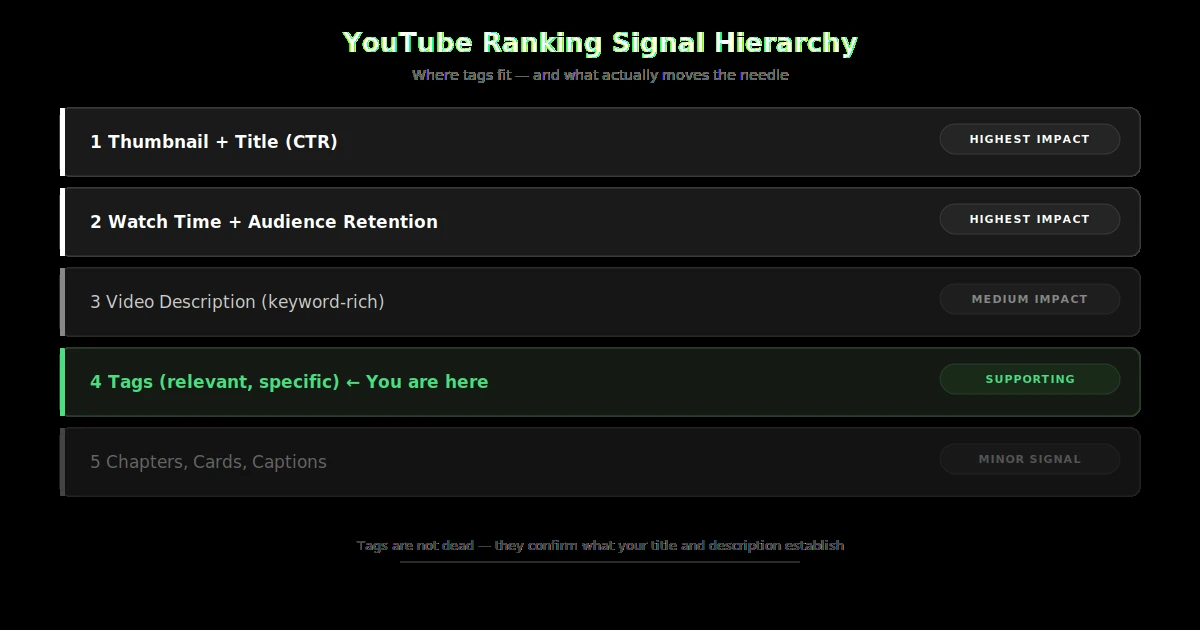
Tags at position 4 doesn't mean irrelevant — it means they're a confirming signal. Title and description establish what your video is about; tags confirm it. A strong title backed by strong tags always outperforms a strong title with no tags.
For a deeper look at metadata strategy, read our guide on tag generator vs manual research — when automation beats human intuition.
6. Tag Best Practices Every Creator Should Follow
These practices are confirmed by real channel tracking — not theory:
✅ First tag = your primary keyword
YouTube weights your first tag more heavily. Make it your exact target keyword — matching your video title closely. If your title is "Minecraft Survival Tips for Beginners," your first tag should be "minecraft survival tips for beginners."
✅ Fill your 500-character tag budget
YouTube limits tags to 500 characters total. Leaving it empty wastes free metadata. YTTAGGEN automatically fills your budget with the most relevant suggestions — no manual guessing needed. Learn more about how many tags you should actually use.
✅ Mix broad and specific tags
Include 2–3 broad category tags for suggested video placement, then fill the rest with 2–4 word specific tags that match real search queries. Specific tags win niche searches; broad tags anchor the category.
✅ Add misspelling variants
If your topic is commonly misspelled, add the misspelling as a tag. It's the one use case YouTube officially endorses — and it costs you nothing.
✅ Understand tags vs title vs description importance
Each metadata element confirms the same topic at a different layer. Your title introduces the keyword. Your description reinforces and expands it. Your tags confirm it with search variants and related terms. When all three align — tags vs title vs description importance all pointing to the same topic — the algorithm's confidence in your video's relevance increases significantly.
❌ Never tag unrelated topics
Tag manipulation violates YouTube's spam policy. Adding trending topics or popular creator names to unrelated videos can result in reduced distribution or strikes.
Generate Your Tags in 30 Seconds
Enter your video title. YTTAGGEN pulls real YouTube search signals and builds your optimised 500-character tag set automatically — free, no login required.
Generate Tags Free →7. Frequently Asked Questions
Do YouTube tags help with search rankings?
Yes, as a secondary signal. Tags help YouTube confirm your video's topic alongside the title and description. They're most useful for misspelling variants, niche categorisation, and topic disambiguation.
Should you always add tags to YouTube videos?
Yes. Leaving the tag field empty wastes free metadata. A properly tagged video always has a small advantage over an untagged one — it takes two minutes and has zero downside.
What is more important than tags on YouTube?
Thumbnail CTR, watch time, audience retention, and title keyword placement are all significantly more important. Tags are a supporting signal. Fix those first, then optimise tags as a secondary step.
Do tags affect YouTube recommendations?
Indirectly. Tags help YouTube categorise your video, which influences suggested video placement — which videos appear alongside yours. Engagement signals matter far more, but proper tags help YouTube put you in the right content neighbourhood.
How many characters can YouTube tags be?
YouTube limits the total tag field to 500 characters. Aim to fill most of this budget with relevant, specific 2–4 word tags. Read our full guide on how many YouTube tags you should use.
Key Takeaways
YouTube tags still matter — as a supporting metadata signal, not a primary ranking driver.
Most impactful for new channels, niche topics, misspelling variants, and multi-language audiences.
Tags can't fix a bad thumbnail, poor watch time, or irrelevant content — those always come first.
Use your full 500-character tag budget with relevant, specific tags. Never leave it empty.
Use real search data — not guesswork. Tools that pull from live YouTube autocomplete produce the best results.
Related Guides
One more: do tags affect YouTube recommendations? Indirectly yes — tags help categorise your content, which influences which suggested video slots it appears in.