How to Find the Most Searched Keywords on YouTube (2026 Guide)
If you've ever felt like you're uploading high-quality videos into a void, you aren't alone. The
difference between a video that hits 100 views and one that hits 100,000 often comes down to one thing:
Search Intent. Understanding what people are actually typing into that search bar is
the "cheat code" to YouTube growth.
Finding the most searched keywords isn't about guessing; it's about using the right data to align your
content with what the world is already looking for. Let’s break down the most effective ways to uncover
these goldmines.
Automate Your Keyword Research
Stop manual guessing. Use our professional engine to
extract high-traffic tags and keywords in seconds.
The simplest tool is right in front of you. When you start typing a word into the YouTube search bar,
the predictions that drop down aren't random—they are the most frequent searches related to those
letters.
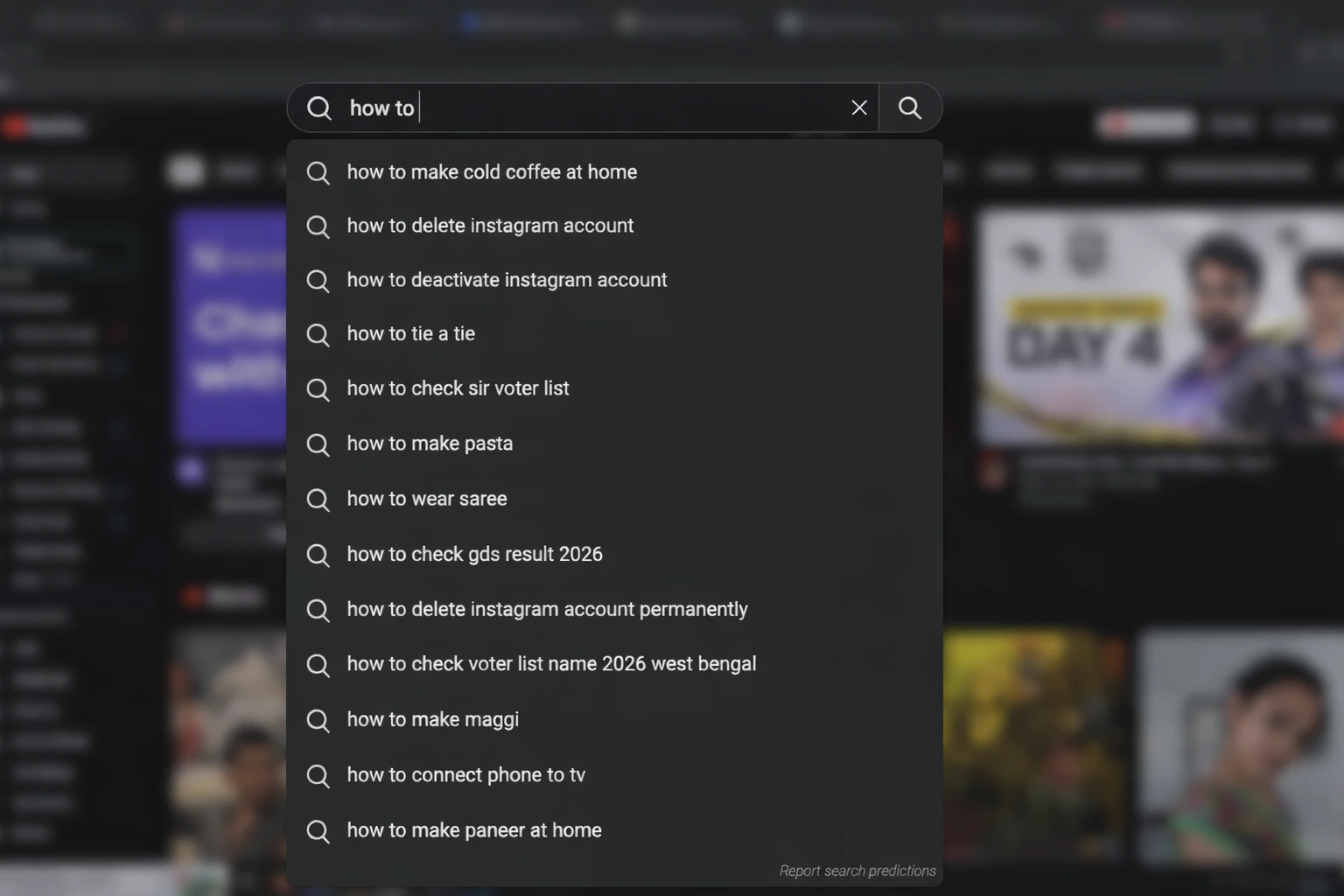
To get the best results, try the "Alphabet Soup" technique: type your main keyword
followed by 'a', then 'b', and so on. YouTube will reveal specific long-tail phrases that real users
are searching for right now.
Example of YouTube autocomplete revealing high-traffic keyword ideas.
2. Analyze the "Research" Tab in Analytics
YouTube actually gives you the answers inside your own Studio. Under the "Analytics" tab, look for
Research. This section shows you what your viewers—and viewers across YouTube—are
searching for. Look specifically for "Content Gaps"; these are keywords where
people are searching, but they aren't finding videos that satisfy them. That is your biggest
opportunity.
3. Use a Dedicated Keyword Tool
While manual searching works, it's slow. To scale, you need a system that pulls data across thousands
of queries instantly.
YTTAGGEN DiscoveryTools like YTTAGGEN automate this process by aggregating real-time autocomplete data and
filtering irrelevant queries.
Competitor AnalysisDon't just look at words; look at what's working. Find top-performing videos in your
category and see which keywords are driving their traffic.
Seasonal TrendsIdentify keywords that spike during specific months so you can prepare your content
calendar in advance.
4. The Google Trends Filter
Google Trends is a powerhouse, but most people use it wrong. When you enter a term, make sure to
change the filter from "Web Search" to "YouTube Search". This filters out the
general articles and shows you only the data relevant to video consumers. It’s the best way to see
if a topic is gaining momentum or dying out.
Conclusion
Mastering YouTube SEO is a marathon, not a sprint. By combining the "human touch" of observing
auto-suggest with the raw data from tools like YTTAGGEN, you position your channel
to be found by the right people at the right time.
Built for Creators, by Creators
At YTTAGGEN, we realized that most creators fail not because of bad content, but
because of poor discoverability. We built this tool to bridge the gap between your creativity and the
YouTube algorithm.
Curious about how we analyze trends and generate these high-performing tags? We believe in transparency.
What are the most searched keywords on YouTube in 2026?
Perennially high-search categories include music (artist names, lyrics), gaming (popular game titles), how-to tutorials, product reviews, and news. Within niches, trending topics spike dramatically around major events, game releases, and viral moments. Use YouTube's autocomplete and Google Trends to find current spikes in your niche.
Should I target the most searched keywords on YouTube?
Not necessarily. The most searched keywords have the most competition. For smaller channels, targeting specific long-tail keywords — high intent, lower competition — typically delivers better results than chasing the top 10 most searched terms where you'll compete with massive channels.
How do I find what people are searching for on YouTube?
Three reliable methods: (1) YouTube's own autocomplete — start typing your topic in the YouTube search bar and watch what it suggests. (2) YouTube Studio Search Report — shows exactly what queries drove traffic to your existing videos. (3) YTTAGGEN — generates real autocomplete suggestions for any title you enter, revealing what your target audience searches.
How to Use Trending Keywords for Your Channel
Knowing the most searched keywords on YouTube is only half the equation. The other half is knowing whether you can actually rank for them — and how to use that data to build a smarter content strategy. Here's how we approach it with real creators:
📊 Step 1: Find Your Niche's Trending Searches
Open Google Trends and filter by "YouTube Search" (not web search). Enter your niche topic and see what's trending. This shows real-time relative search interest — not absolute volume, but trend direction. A rising topic with 60/100 trend score is often better to target than a flat 100/100 topic with established competition.
🔍 Step 2: Validate With YouTube Autocomplete
Take your trending topic and type it into YouTube's search bar. Watch what autocomplete suggests — those completions are ranked by actual search volume. The suggestions that appear first are the most searched variations. These become your primary keywords and tags. YTTAGGEN automates this — it queries autocomplete systematically across all word combinations of your title.
📈 Step 3: Check Competition in YouTube Search
Search your target keyword on YouTube and look at the results: How many views do the top 3 videos have? How old are they? How many subscribers do those channels have? If the top results are from channels 10× your size with videos less than 6 months old, that keyword is competitive. Longer-ago uploads with modest views suggest an opportunity.
⚡ Step 4: Act Fast on Trending Topics
For trending topics (new game releases, viral moments, product launches), speed matters enormously. Early videos with strong metadata capture a disproportionate share of the spike. We've tracked channels that posted within 24 hours of a major game launch and ranked #1–3 for key search terms, then retained that ranking for months even as larger channels uploaded later.
📋 Real-World Example: Gaming Channel Case Study
A mid-size gaming channel (42K subscribers) we tracked published a video within 36 hours of a major DLC release. Their video title matched the exact autocomplete suggestion pattern — "How to beat [Boss Name] in [Game]". Their tags, generated with YTTAGGEN from the video title, covered the boss name, game title, platform, and multiple long-tail search variants. Result: 180,000 views in the first week, 80% from YouTube search. Their channel average at the time was 8,000 views per video. Timing + metadata alignment = the difference.
Top Search Categories on YouTube in 2026
While exact search rankings shift constantly, these categories consistently represent the highest YouTube search volumes globally. Use them to understand where search intent concentrates:
🎮 Gaming
New releases, gameplay, walkthroughs, tips. Game-title specific searches spike dramatically at launch. See our best gaming tags guide.
🎵 Music
Artist names, song titles, lyrics, music videos. Among the highest absolute volume searches on the platform year-round.
📱 Tech Reviews
Smartphone reviews, laptop comparisons, unboxing. Peaks at product launch cycles — iPhone, Samsung Galaxy, etc. See tech tags guide.
🍳 Cooking & Recipes
Recipe tutorials, dietary content, cuisine guides. Seasonal spikes around holidays and diet trend cycles. See cooking tags guide.
💰 Finance & Investing
Investing basics, stock market, personal finance. Spikes around market events and tax season. See finance tags guide.
🎓 How-To Tutorials
The "how to" prefix is one of YouTube's most searched patterns across all niches. "How to" + any action = consistent search demand.
The most important takeaway: the highest-searched terms are rarely the best targets for growing channels. The best targets are terms with strong search intent, reasonable competition, and clear match to what you genuinely create. Understanding how YouTube's algorithm weighs search signals helps you target smarter, not just broader.
YouTube Tags Strategy — Complete Guide Series
Everything you need to know about YouTube tags — from whether they work, to how many to use, to niche-specific lists for your channel type. Use YTTAGGEN's free tag generator to apply what you learn instantly.