YouTube SEO: Complete Guide to Ranking Videos in 2026
Getting views on youtube is not a luck its about your pure understanding related to the Youtube's algorithm and using that knowledge for your advantage. No one born with talent but knowledge brings talent. So here the complete SEO guide to Rank your Videos in 2026
As a creator I am 100% sure and I can tell you this: most creators completely ignore YouTube SEO. They spend hours editing their videos and thats important to engage your viewer but won't spend 10 minutes researching the right tags, description and title. Then they wonder why nobody's watching.
This guide covers everything you need to know about YouTube SEO, the best tools to use, and how to actually rank your videos without spending money on expensive software.
What is YouTube SEO?
YouTube SEO is the process of optimizing your videos, playlists, and channel to rank higher in YouTube's search results. When someone searches for "how to edit videos" or "best budget laptop," you want your video showing up on the first page. That's YouTube SEO.
Unlike Google SEO where you're optimizing text on a webpage, YouTube SEO involves optimizing video titles, descriptions, tags, thumbnails, and even the content inside your video. YouTube's algorithm looks at all of these to decide which videos to show first.
The biggest mistake I see creators make is treating YouTube like a video hosting platform. It's not. It's a search engine. The second largest search engine in the world, actually. And just like Google, it has rules about what ranks and what doesn't.
Why YouTube SEO Actually Matters
Here's the reality: YouTube has over 2 billion monthly users. Every minute, 500 hours of video get uploaded to the platform. Your video is competing against millions of others. If you're not doing SEO, you're basically hoping the algorithm randomly picks your video. That's not a strategy.
Good YouTube SEO does three things. First, it helps YouTube understand what your video is about so it can show it to the right people. Second, it makes your video more appealing in search results so people actually click on it. Third, it helps YouTube recommend your video to people who aren't even searching for it.
The difference between a video with proper SEO and one without is massive. I've seen identical videos from the same creator – one optimized, one not – get completely different results. The optimized one got 10x more views in the first week.
The Main Components of YouTube SEO
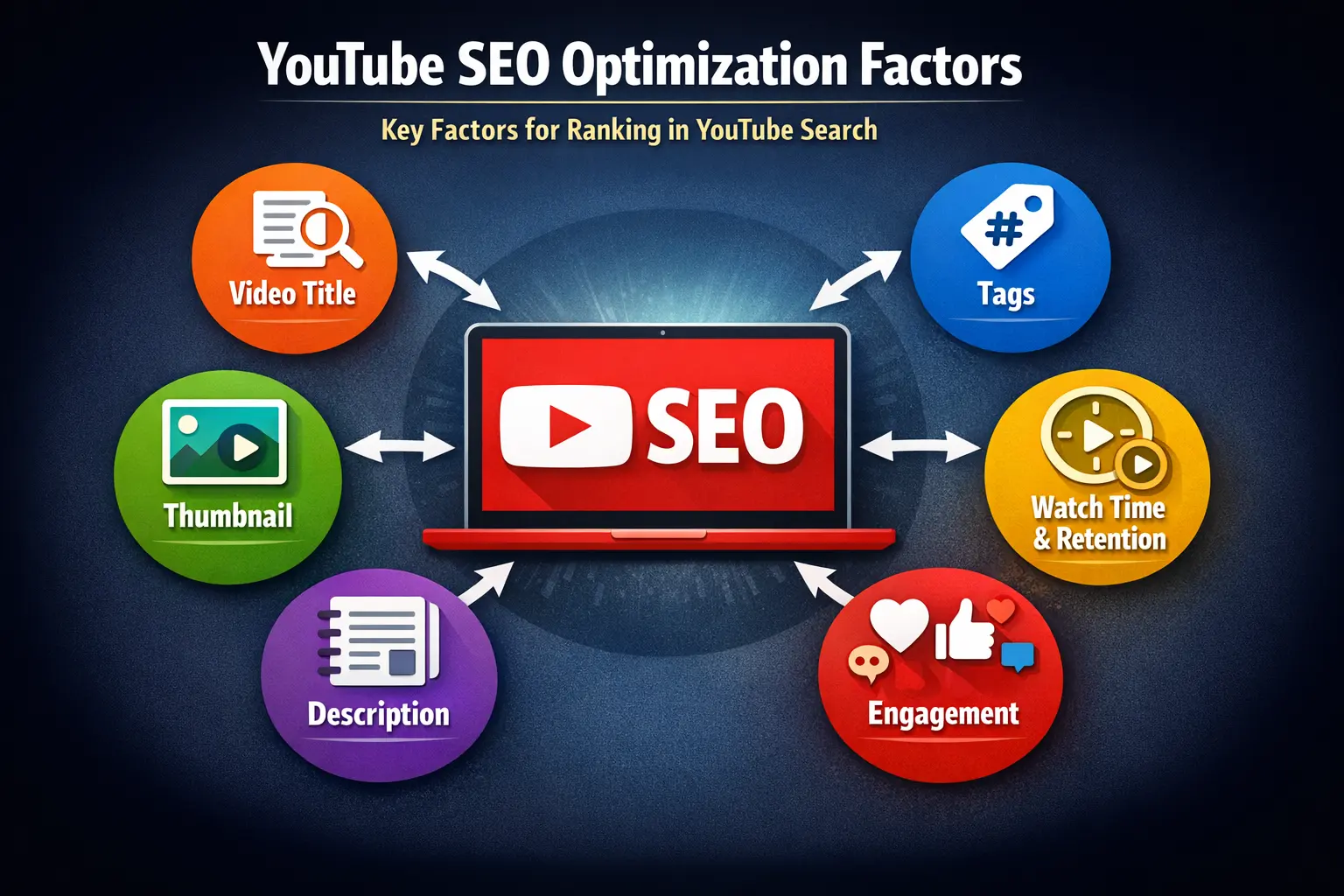
YouTube SEO isn't one thing. It's a combination of factors that work together. Let me break down what actually matters.
- Video Title Your title needs to include your main keyword naturally. If you're targeting "premiere pro tutorial," that phrase should be in your title. But don't just stuff(repeat) keywords – make it compelling enough that people want to click. YouTube tracks click-through rate(CTR) heavily.
- Video Description The first 150 characters of your description appear in search results, so front-load your keywords there. Then use the rest of the description to elaborate on what your video covers. Include relevant keywords naturally, description should be written for humans not for algorithm.
- Tags Tags help YouTube understand your video's context. Use a mix of broad tags (like "tutorial") and specific tags (like "premiere pro color grading 2026"). You get 500 characters for tags – use them wisely. This is where a good tag generator comes in handy. Using tag that has more search volume are preferable.
- Thumbnail Your thumbnail doesn't directly affect SEO, but it affects click-through rate, which YouTube cares about a lot. A video that gets clicked more ranks higher. Make your thumbnails stand out. Use contrasting colors, readable text, and clear image.
- Watch Time & Retention YouTube prioritizes videos that keep people watching. If someone clicks your video and leaves after 10 seconds, that tells YouTube your video isn't good. Aim for at least 50% average view duration. Hook viewers in the first 5 seconds and deliver on what you promised in the title.
- Engagement Signals Likes, comments, shares, and subscriptions all signal to YouTube that your video is valuable. Ask viewers to engage, but don't be annoying about it. A simple "let me know in the comments" works better than begging for likes.
🚀 Generate Optimized Tags for Your Videos
YTTAGGEN analyzes real-time YouTube search data to generate tags that actually help your videos rank. Free, unlimited, no signup required.
Best YouTube SEO Tools (Free & Paid)
You don't need to spend thousands on SEO tools. There are free options that work just as well for most creators. Here's what I actually use and recommend.
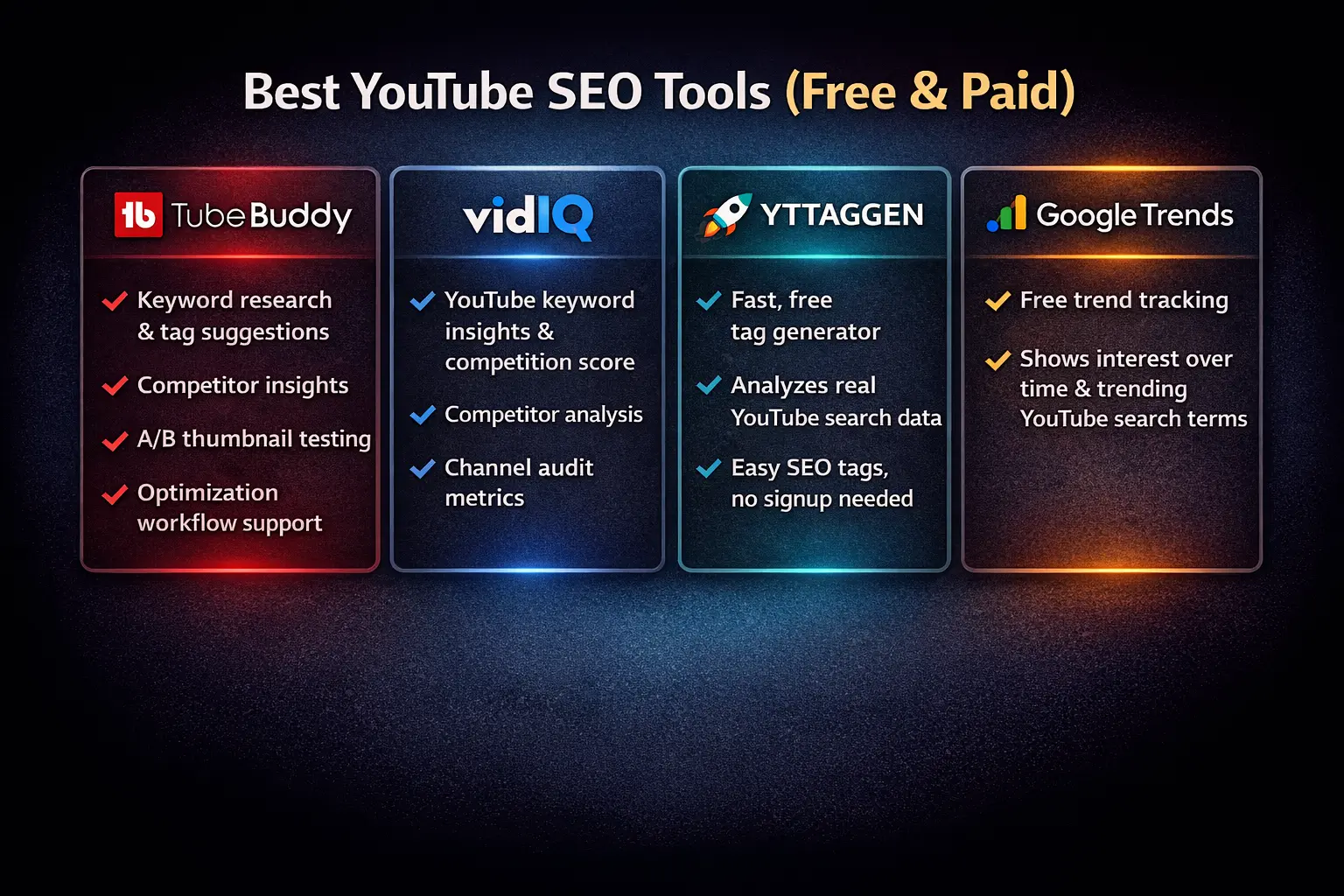
TubeBuddy is probably the most popular YouTube SEO tool out there. The free version gives you keyword research, tag suggestions, and basic analytics. The paid version adds more advanced features like A/B testing for thumbnails and bulk processing. It's solid, but the free version has daily limits that get annoying fast.
VidIQ is TubeBuddy's main competitor. Similar features, similar pricing. The free version shows you keyword scores and competition levels right in YouTube Studio. The paid version unlocks competitor analysis and historical data. Both tools are good – pick whichever interface you prefer.
YTTAGGEN is what used for tag generation specifically. It's completely free with no limits. You enter your video title, it analyzes YouTube's autocomplete data, and gives you relevant tags instantly. No account needed, no credit card, just paste your title and copy the tags. For purely tag generation, it's faster than TubeBuddy or VidIQ.
YouTube Studio Analytics is free and built into YouTube. People overlook this. Your own analytics tell you which videos are performing well, what keywords people are finding you with, and where you're losing viewers. Check your "Reach" tab to see what's working.
Google Trends is free and underrated for YouTube SEO. It shows you if a topic is trending up or down over time. Before making a video on "crypto trading," check if people are actually searching for that right now or if interest is dying off.
How to Do Keyword Research for YouTube
Keyword research is where most people get stuck. They either skip it completely or overthink it. Here's the simple process I use.
Start with YouTube's autocomplete. Type your topic into YouTube's search bar and see what it suggests. Those suggestions are real searches from real people. If YouTube is suggesting it, people are searching for it. YTTAGGEN uses this technology for generating tags
Look at the competition for each keyword. Search for your target keyword and see what videos rank. Are they from massive channels with millions of subscribers? If yes, you'll have a hard time ranking. Look for keywords where smaller channels are ranking – that's your opportunity.
Check the video count for your keyword. If you search "how to edit videos" and see 50 million results, that's tough competition. If you search "how to edit drone footage in premiere pro" and see 500,000 results, that's more manageable. Go specific when you're starting out.
Use a mix of short-tail and long-tail keywords. "Gaming" is a short-tail keyword – huge search volume, massive competition. "Best gaming laptop under 50000 for students" is long-tail – less volume but way easier to rank for and more likely to convert.
Step-by-Step: Optimizing Your Video for SEO
Let's say you're making a video about learning Python. Here's exactly how I'd optimize it.
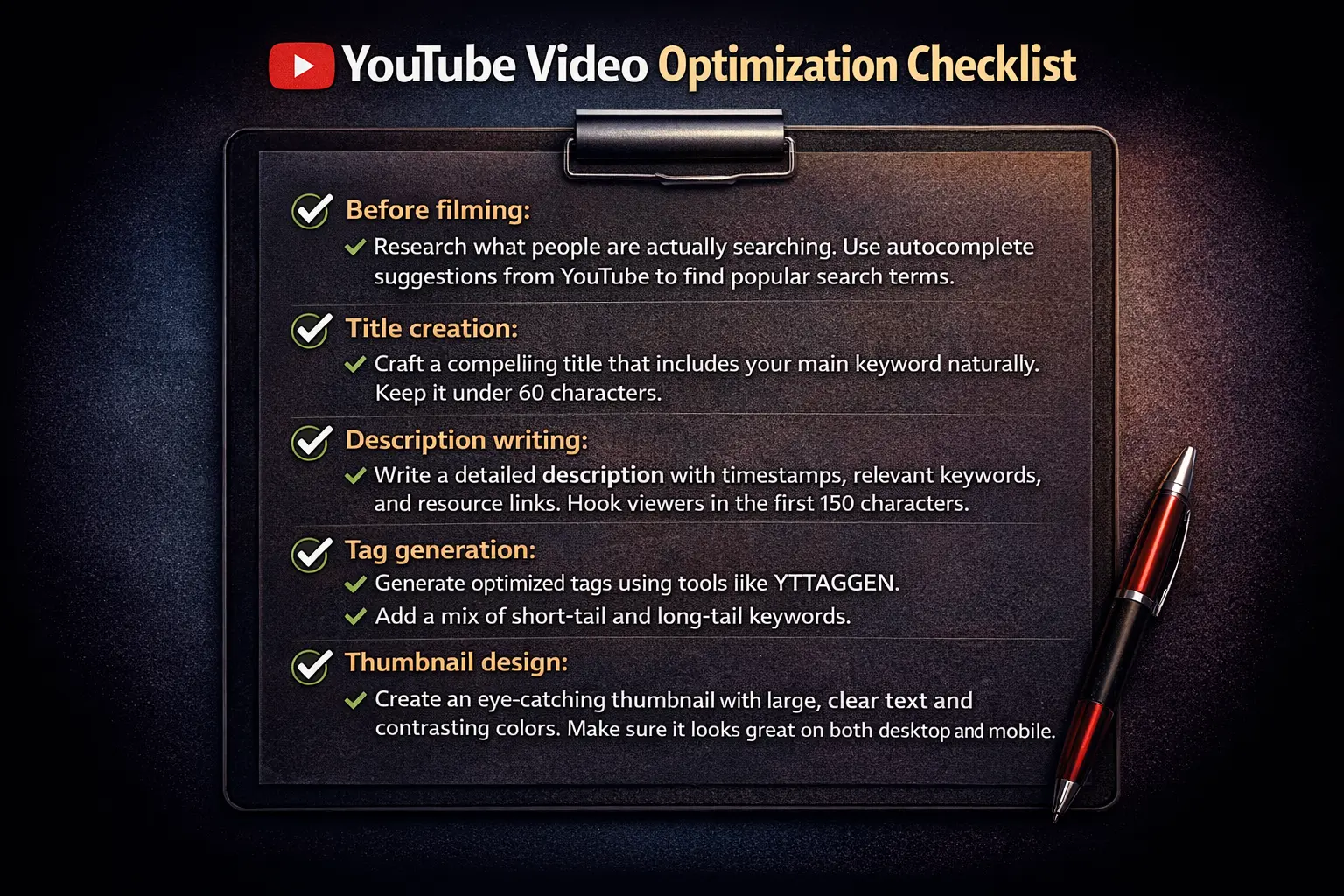
Before filming: I'd research what people are actually searching. I'd type "learn python" into YouTube and note the autocomplete suggestions. Maybe I see "learn python for beginners," "learn python in 2026," "learn python for data science." These become potential angles for my video.
Title creation: I'd go with something like "Learn Python Programming for Beginners – Complete Course 2026." This includes the main keyword (learn python), specifies it's for beginners, mentions it's comprehensive, and includes the year for relevance. Under 60 characters so it doesn't get cut off in search results.
Description writing: First 150 characters would be: "Complete Python programming course for beginners in 2026. Learn Python from scratch with practical examples, projects, and exercises. Perfect for complete beginners." Then I'd expand with timestamps, what the video covers, links to resources, and related keywords naturally worked in.
Tag generation: I'd use YTTAGGEN to generate tags based on my title. The tool would give me variations like "python tutorial," "learn python 2026," "python for beginners," "python programming course," etc. I'd copy all the tags it generates since they're already optimized to fit the 500-character limit.
Thumbnail design: I'd create a thumbnail with "PYTHON" in large text, "Complete Course" as a subtitle, and maybe a visual of code in the background. High contrast colors that stand out. No tiny text that's unreadable on mobile.
After upload: I'd pin a comment asking what viewers want to learn next, encouraging engagement. I'd add the video to a relevant playlist on my channel. I'd share it in communities where Python learners hang out (not spam, genuinely helpful sharing).
Common YouTube SEO Mistakes to Avoid
I've made every mistake in the book. Let me save you some time by listing what doesn't work.
Keyword stuffing is probably the biggest mistake. People think more keywords = better ranking. So they write titles like "Best Gaming Laptop Gaming PC Gaming Setup Gaming Room Gaming Chair." That's not optimization, that's spam. YouTube can tell. Use keywords naturally.
Ignoring watch time is another big one. You can have perfect SEO but if people click off your video in 10 seconds, YouTube won't promote it. SEO gets people to click. Your content has to keep them watching. Hook them fast and deliver value.
Copying bigger channels' exact keywords doesn't work if you're small. MrBeast can rank for "challenge" because he's MrBeast. You can't. Find keywords where channels your size are ranking. Build authority in your niche before competing for massive keywords.
Using irrelevant tags to get views backfires. Don't tag your gaming video with "MrBeast" just because he's popular. YouTube penalizes misleading metadata. Use tags that accurately describe your content. The algorithm is smarter than you think.
Neglecting older videos is leaving views on the table. Go back to your old videos and update their titles, descriptions, and tags with what you know now. I've seen old videos start getting views again just from updating their metadata.
How Long Does YouTube SEO Take to Work?
This is the question everyone asks. The honest answer is: it depends, but usually 1-3 months for new channels.
YouTube needs time to gather data on your video. How many people click it? How long do they watch? Do they engage? It takes dozens or hundreds of views before YouTube has enough data to confidently promote your video. If you're a new channel with no watch history, this takes longer.
The good news is that YouTube SEO has compounding effects. Your first video might take 2 months to get traction. Your tenth video might take 2 weeks. As your channel builds authority, new videos get promoted faster. Keep publishing consistently.
Some videos explode immediately. Others take 6 months then suddenly take off. I have videos from a year ago that barely got views initially but are now getting thousands of views per month. That's the nature of SEO – it's a long game.
YouTube SEO vs YouTube Algorithm
People often confuse these. YouTube SEO is about ranking in search results when someone types a query. The YouTube algorithm (recommendations) is about getting your video suggested to people who aren't searching for anything.
They work differently. SEO requires keyword optimization and matching search intent. The algorithm prioritizes watch time, click-through rate, and viewer satisfaction. You need both.
Here's how they interact: Good SEO gets initial views from search. If those viewers watch your entire video and engage, the algorithm starts recommending it to similar viewers. That's when views really take off. SEO is your starting point. The algorithm is your growth engine.
Ready to Rank Your Videos Higher?
Start with proper tag optimization. YTTAGGEN generates relevant, high-performing tags for any video topic. Used by thousands of creators. Zero cost, zero limits.
Advanced YouTube SEO Tactics
Once you've got the basics down, here are some advanced techniques that actually work.
Create series and playlists. YouTube loves when viewers binge-watch your content. If you can get someone to watch 3 of your videos in a row, YouTube considers that a strong positive signal. Structure your content as series. Make it natural for viewers to watch multiple videos.
Optimize your channel page. Your channel description, channel keywords, and featured video all affect how YouTube understands your content. Fill these out completely. Use keywords that describe your entire channel, not just individual videos.
Build topical authority. Don't jump around topics randomly. If you make 10 videos about Python programming, YouTube starts seeing you as a Python channel. That makes ranking for Python-related keywords easier. Niche down before going broad.
Use chapters and timestamps. Adding chapters to your video helps with SEO in two ways. First, it keeps viewers watching because they can skip to the parts they care about. Second, YouTube can rank individual chapters in search results, giving you more visibility.
Collaborate with similar-sized channels. Guest appearances introduce your content to new audiences with similar interests. YouTube's algorithm notices when viewers watch both of your channels and starts cross-recommending. This is huge for growth.
Free YouTube SEO Tools You Should Use
You don't need paid tools to do effective YouTube SEO. These free tools cover 90% of what you need.
YTTAGGEN handles all your tag generation needs. It's fast, accurate, and completely free. No daily limits, no account required. Just generate tags and copy them. It's faster than manually researching tags.
YouTube Studio is your analytics dashboard. Check which videos are getting impressions, what your click-through rate is, where viewers are dropping off. This data tells you what's working. Don't upload and forget – actually look at your stats.
Google Keyword Planner is technically for Google Ads but works for YouTube too. People searching on Google often search the same things on YouTube. Use it to see search volumes and find related keywords.
Canva is free for basic use and perfect for creating thumbnails. They have YouTube thumbnail templates. You don't need Photoshop. A clean, eye-catching thumbnail made in Canva beats a mediocre one made in Photoshop.
Answer the Public shows you questions people are asking about your topic. These questions make great video ideas and titles. If people are asking "how long does it take to learn Python," that's a video opportunity.
Measuring Your YouTube SEO Success
You need to track the right metrics to know if your SEO efforts are working. Here's what actually matters.
Impressions and CTR: Impressions are how many times YouTube showed your video to people. CTR (click-through rate) is what percentage clicked. If your impressions are growing but CTR is dropping, your thumbnail or title needs work. Aim for 4-10% CTR.
Traffic sources: Go to YouTube Studio and check where your views come from. "YouTube search" means your SEO is working. "Suggested videos" means the algorithm likes your content. "External" means people are sharing your videos. You want a mix of all three.
Average view duration: This is more important than total views. A video with 1,000 views and 60% retention is better than a video with 10,000 views and 20% retention. YouTube ranks videos that keep people watching.
Ranking position: Search for your target keyword in incognito mode and see where your video ranks. Track this over time. Moving from position 15 to position 5 is progress, even if your views haven't exploded yet.
Final Thoughts on YouTube SEO
YouTube SEO isn't complicated, but it does require consistency. You can't optimize one video perfectly and expect magic. You need to apply these principles to every video you make.
The creators who succeed on YouTube are the ones who treat it like a search engine, not a social media platform. They research keywords, optimize their metadata, and create content that matches search intent. Then they repeat that process over and over.
Start with the basics. Get your titles, descriptions, and tags right. Make thumbnails that stand out. Create content that people actually want to watch all the way through. Everything else builds on that foundation.
And don't obsess over perfection. Upload consistently, track what works, and improve over time. Your 50th video will be better optimized than your first. That's fine. Just start.
Written by PD Developer @YTTAGGEN, specializing in YouTube metadata optimization and search intent analysis.